
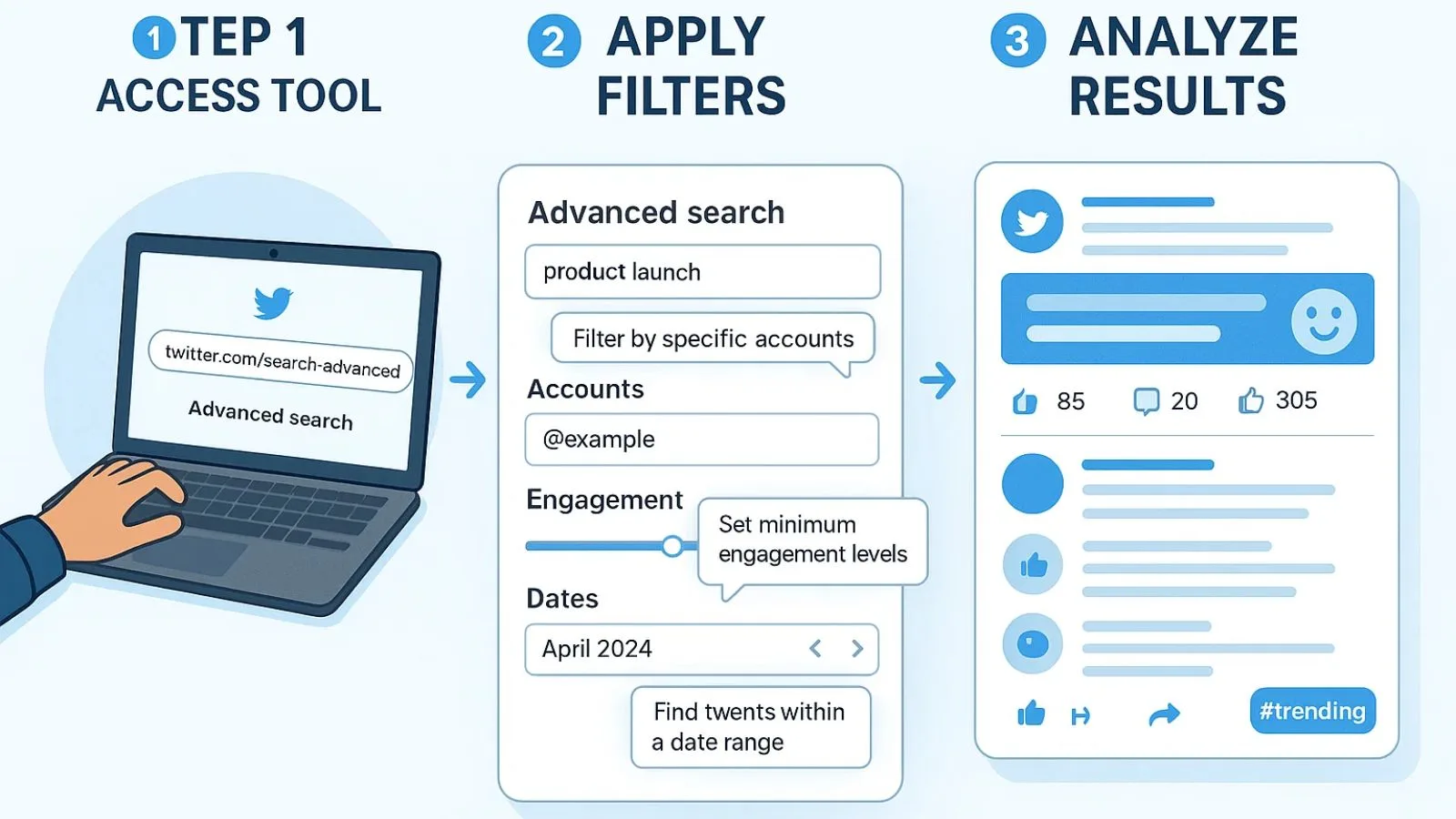
Have you ever tried to find a funny tweet from three years ago? Or maybe you want to see what people in your city are saying about a new movie. Using the basic search bar on X can be very frustrating. It often shows you things you don’t care about. That is why you need to learn about advanced twitter search. This tool is like a magnifying glass for the internet. It helps you zoom in on exactly what you want to see without all the noise.
In this guide, we will explore how advanced twitter search works in 2026. It is a hidden gem that most people never use. Once you learn the tricks, you will be able to find hidden conversations and old memories in seconds. Whether you are a business owner or just looking for a specific meme, this tool changes how you use social media. Let’s dive in and see how easy it is to become a search pro!
What is Advanced Twitter Search Exactly?
At its core, advanced twitter search is a specialized page on the X website. It provides you with several text boxes to fill out. Each box acts as a filter. For example, one box asks for specific words, while another asks for words you want to leave out. This is much better than the standard search bar. It allows you to be very specific so the computer knows exactly what to look for.
When you use advanced twitter search, you are telling the platform to ignore the “junk” results. You can look for tweets that only have a certain number of likes or retweets. This is great for finding high-quality information. It turns a giant pile of data into a neat, organized list. It is one of the most powerful free tools available on the web today for finding real-time news.
How to Find the Secret Search Menu
Many people ask where the advanced twitter search button is hidden. On a desktop computer, you first type something into the regular search bar. Once the results appear, look for three small dots near the search bar. Click those dots, and a menu will pop up. From there, you can select the advanced option. It feels like finding a secret doorway to a much larger library of information.
If you are using a phone, the advanced twitter search can be a bit trickier. You often have to use the mobile browser instead of the app to see all the options. However, you can also type “search operators” directly into the app. These are special codes that do the same thing. Learning these shortcuts makes you look like a tech wizard in front of your friends and coworkers.
Searching by Specific Dates and Times
One of the best ways to use advanced twitter search is to look through history. You can set a “From” date and a “To” date. This is perfect if you want to remember what happened on your birthday five years ago. Or maybe you want to see the news from a specific day in history. Without these date filters, finding old tweets would take hours of scrolling through endless profiles.
By using advanced twitter search for dates, you can also track how an idea grew over time. You can see who talked about a topic first. This is very helpful for students writing papers or reporters checking facts. It is like having a time machine for conversations. You just pick the day on the calendar, hit search, and watch the past come back to life on your screen.
Filtering by Accounts and People
Sometimes you know who said something, but you can’t remember when. The advanced twitter search tool lets you search inside a specific user’s history. You can type in their @username and a keyword. For example, you could search for “pizza” on your favorite celebrity’s page. This will show you every time they ever mentioned pizza! It is a fun and fast way to explore a profile.
You can also use advanced twitter search to see conversations between two people. You put one name in the “From these accounts” box and another in the “To these accounts” box. This shows you their public back-and-forth messages. It is very useful for seeing how experts discuss important topics. It helps you learn from the best by watching their public debates and helpful tips.
Finding Local News and Nearby Events
Did you know you can search by location? The advanced twitter search allows you to see what is happening near you right now. You can filter results to show tweets from people in your specific city or zip code. This is wonderful during big events like festivals or even during bad weather. It gives you a “boots on the ground” view of what is going on in your neighborhood.
Using advanced twitter search for local info helps you stay safe and informed. If there is a traffic jam nearby, people will usually tweet about it first. By checking the local filters, you can find a better way home. It makes the global platform feel much more like a local community. It connects you with your neighbors in a way that the main feed often misses.
Using Negative Keywords to Hide Junk
We have all searched for something only to get results for something else. If you search for “Apple,” you might get results for the fruit when you wanted the phone. The advanced twitter search has a box for “None of these words.” This is a lifesaver! You can type in words you don’t want to see to clean up your results list instantly.
This feature makes advanced twitter search much more accurate than other social sites. By removing the words that confuse the search engine, you get a clean list of relevant tweets. It saves you from having to look at hundreds of useless posts. It is all about giving you control over your screen. You decide what you want to see and what you want to hide.
Sorting by Likes and Popularity
If you only want to see the “best” tweets, you can filter by engagement. In the advanced twitter search menu, you can set a minimum number of likes. For example, you can ask to only see tweets with at least 500 likes. This usually filters out spam and low-quality posts. It helps you find the most popular opinions or the funniest jokes that everyone is talking about.
This part of advanced twitter search is great for discovering viral content. If you are looking for a new recipe, searching for “pasta” with high likes will show you the most trusted ones. It acts as a built-in “quality check” for the internet. Instead of guessing which post is good, you let the community’s votes guide you to the very best content available.
Searching in Different Languages
The world is a big place, and people tweet in many languages. The advanced twitter search allows you to pick a specific language for your results. If you are learning Spanish, you can search for “music” and select the Spanish filter. This shows you how people in other countries talk about your favorite topics. It is a great way to practice a new language.
Even if you only speak one language, the advanced twitter search language filter is helpful. It ensures you don’t get results you can’t read. It keeps your feed relevant to your needs. This global reach is what makes X such a unique place, and the search tool is the key to unlocking all those different cultures and perspectives safely.
Finding Links and Videos Only
Sometimes you aren’t looking for words; you are looking for a video or a news article. The advanced twitter search has checkboxes for “Links only.” This removes all the short status updates and only shows you tweets that share a website. It is the fastest way to find a specific news story or a YouTube video that someone shared recently.
You can also filter for tweets that have images or videos attached. If you are looking for a photo of a specific car, advanced twitter search makes it easy to find. It turns the platform into a massive gallery of media. This is much better than searching on a general search engine because you see what real people are sharing in the moment.
Saving Your Frequent Searches
Once you create a perfect search with all your filters, you don’t want to lose it. X allows you to save your advanced twitter search queries. This means you can come back tomorrow and see new results for that exact same search with one click. It is a huge time saver for people who track specific hobbies or business topics every single day.
To save a search, look for the menu button after you have performed your advanced twitter search. Click “Save search,” and it will appear in your list whenever you tap the search bar. It is like bookmarking a page in a book. You never have to type in those long dates or complicated keywords ever again. It is all about making your digital life easier and faster.
Conclusion:
As we have seen, advanced twitter search is much more than just a search bar. It is a powerful tool that helps you find exactly what you need in a world full of noise. By using dates, locations, and engagement filters, you take back control of your social media experience. You no longer have to settle for whatever the “algorithm” wants to show you today.
Now that you know the secrets, go ahead and try an advanced twitter search for yourself! Look for an old memory or a local news story. You will be surprised at how much you can find when you have the right tools. The internet is a big place, but with these tips, you will never feel lost again. Start searching and discover something amazing today!
FAQs
1. Is advanced twitter search free to use?
Yes! It is a completely free feature built into the X platform. You do not need a paid subscription or a “Blue” checkmark to use these powerful search tools.
2. Can I use advanced search on the mobile app?
The full menu is mostly on the desktop site, but you can use “search operators” (like “from:username”) in the mobile app. To see the full menu on a phone, use your web browser.
3. Will the person know I searched for their tweets?
No, searching is private. The person you are looking for will never get a notification that you used advanced twitter search to find their old posts.
4. How far back can I search?
You can search all the way back to the very beginning of Twitter in 2006. As long as the account is public and the tweets weren’t deleted, you can find them.
5. What are “search operators”?
These are short codes you type into the search bar. For example, “since:2023-01-01” is a code that tells the site to only show results from that date. It’s a fast way to use advanced twitter search.
6. Can I search for private accounts?
No, you can only search for public tweets. If an account is “locked” or private, their tweets will not show up in the advanced twitter search results for the general public.